Variation Swatches and Gallery
for WooCommerce
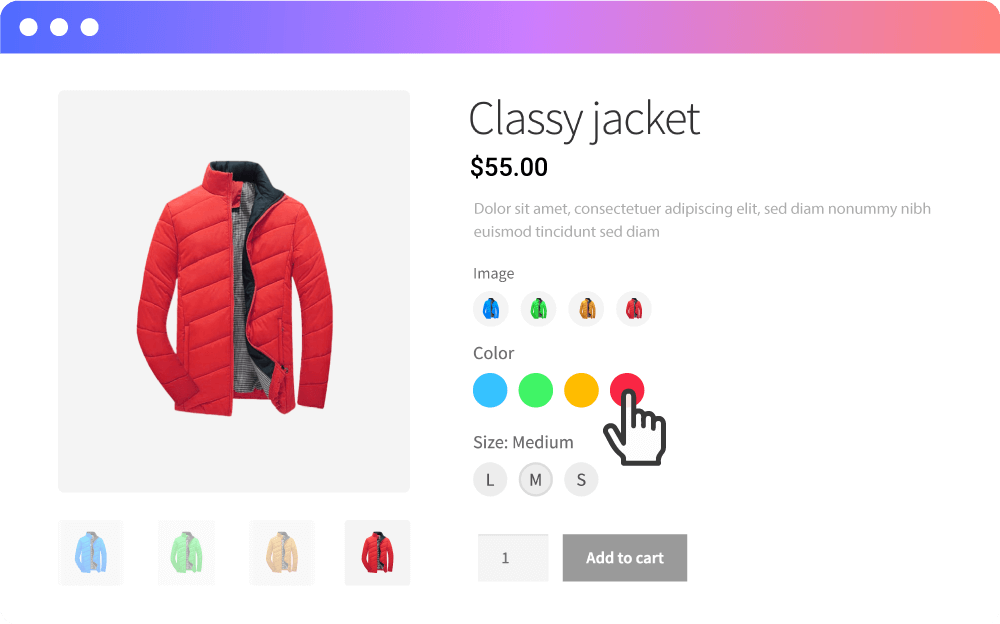
Say goodbye to boring dropdown menus. Transform your variable products into stunning Color, Image, Button & Radio swatches with a built-in variation gallery — just like top stores on Amazon & AliExpress.
The only free plugin with Variation Image Gallery + Stock Count by Variation
Premium Cotton T-Shirt
$29.99
Color
Size
Show Stock Quantity
by Variation
Customers can see exactly how many items are left for each specific variation — creating urgency and helping them make faster buying decisions.
This feature is not available in other free swatches plugins. Combined with our smart out-of-stock handling (blur, cross-out, or hide), your customers always know what's available.
Beautiful Swatches for Every Need
Replace dull WooCommerce dropdowns with visually appealing swatches that improve customer experience and increase conversions.
Color Swatches
Display vibrant color circles or squares. Perfect for clothing, accessories, and home decor products.
Live DemoImage Swatches
Show product photos, patterns, or textures as selectable thumbnails. Great for fabrics and materials.
Live DemoButton Swatches
Clean, clickable text buttons for sizes, styles, or any text option. Most popular for size selectors.
Live DemoRadio Swatches
Classic radio-style selectors. Ideal for yes/no options, simple toggles, or limited option sets.
Live DemoVariation Image Gallery
Included Free
Most plugins charge $49+ for a variation gallery. We include it for free.
Upload unlimited images for each variation. When a customer selects "Red / Large", they see a full gallery of that exact combination — just like shopping on Amazon.
- Unlimited gallery images per variation
- Gallery swaps when customer selects a variation
- Works with your theme's native WooCommerce gallery

Everything You Need,
Zero Cost
No setup headache. Install, activate, and your dropdowns instantly become beautiful swatches.
4 Swatch Types
Color, Image, Button, and Radio — choose the perfect swatch type for each product attribute.
Variation Image Gallery
Unlimited gallery images per variation. Customers see the exact photos for their selected options.
Stock Count by Variation
Show exact stock quantities for each variation. Creates urgency and helps customers decide faster.
Smart Out-of-Stock Handling
Blur, cross out, or hide unavailable variations. Prevent customer frustration with clear visual cues.
Customizable Shapes
Circle, Rounded, or Square — pick the swatch shape that matches your store design and branding.
Hover Tooltips
Sleek tooltips appear on hover showing attribute labels. Positioned Top or Bottom to fit your layout.
Ajax Performance
Custom Ajax Variation Threshold handles stores with hundreds of variations without slowing down.
Flexible Layout
Inline or Block display. Selected attribute name shown beside label. Plus a Clear Selection button.
Automated Defaults
Set Button or Image as the global default type. No need to configure every product individually.
Unlock the Full Potential
Take your store to the next level with features designed for maximum flexibility and conversions.
-
Shop & Archive Page Swatches
Customers select variations directly from shop/category pages — no need to visit each product.
-
Per-Product Override
Different swatch types, shapes, or styles for individual products. Full control over each product page.
-
Advanced State Styling
Control Normal, Hover, and Selected states with custom colors, borders, and box shadows.
-
Image & Text Tooltips
Rich tooltips with product images or custom text. Plus full tooltip color/style customization.
-
Priority Support
Fast, dedicated support from the developers who built the plugin.
Swatches on Shop Page
Let customers select colors and sizes right from the product listing — fewer clicks, more sales.
Per-Product Control
Override global settings per product
Custom Styling
Colors, borders & shadows
Rich Image Tooltips
Show product images inside tooltips on hover. Customize tooltip colors to match your brand.
Free vs Pro
See exactly what you get with each version.
| Feature | Free | Pro |
|---|---|---|
| Color, Image, Button, Radio Swatches | ||
| Variation Image Gallery (Unlimited) Free! | ||
| Stock Count by Variation Exclusive | ||
| Out-of-Stock Handling (Blur/Cross/Hide) | ||
| Customizable Swatch Shapes | ||
| Hover Tooltips (Top/Bottom) | ||
| Ajax Variation Threshold | ||
| Clear Selection Button | ||
| Inline & Block Display | ||
| Shop / Archive Page Swatches | ||
| Per-Product Override Settings | ||
| Advanced State Styling (Hover, Selected) | ||
| Image & Text Tooltips | ||
| Custom Tooltip Styling | ||
| Priority Support |
Up & Running in 3 Minutes
No coding required. No complicated settings.
Install & Activate
Search "Variation Swatches and Gallery" in WordPress Plugins. Install, activate — done. Dropdowns auto-convert to button swatches instantly.
Configure Attributes
Go to Products > Attributes, change type from "Select" to Color or Image, assign colors/images to each term.
Customize & Sell
Fine-tune shapes, tooltips, stock display, out-of-stock behavior, and gallery from the settings. Your swatches are live!
Works With Your Stack
Compatible with all popular WooCommerce themes and plugins.
Any WooCommerce Theme
Quick View Plugins
WooCommerce HPOS
Flatsome
OceanWP
Divi & Elementor
"This plugin solved my client requirements. I had an issue and the author supported me very quickly. Great plugin, fulfill my requirements, excellent support!"-- designunique
Verified WordPress.org Review
Frequently Asked Questions
Why are my variations still showing as dropdowns?
Is this plugin compatible with my theme?
Does it work with Quick View plugins?
Can I show swatches on the shop/catalog page?
How does the stock count by variation work?
How many variations can it handle?
What happens to out-of-stock variations?
Does it work with WooCommerce HPOS?
Ready to Transform Your Product Pages?
Join WooCommerce store owners who use Variation Swatches and Gallery to boost conversions and create a premium shopping experience.
Free version includes Variation Gallery + Stock by Variation — features others charge for.