Genealogical Tree
Family Tree Plugin for WordPress
Create, display, and share beautiful interactive family trees on your WordPress site. The most comprehensive genealogy plugin with member profiles, GEDCOM support, and collaborative editing.
Pro version + powerful add-ons: Frontend Builder, Collaboration & GEDCOM Import
Visualize Your Complete
Family History
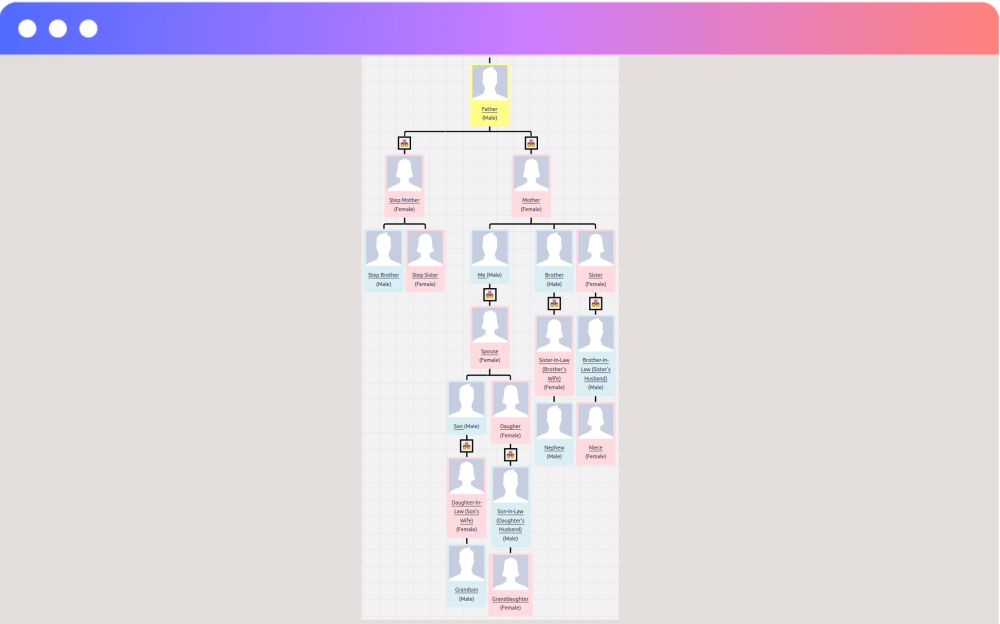
Create interactive, zoomable family trees that display across generations. From a single ancestor to hundreds of family members — our plugin handles it all with beautiful, responsive tree diagrams.
Color-coded member cards distinguish male, female, and other members at a glance. Collapsible branches keep large trees navigable.
Beautiful Tree Layouts for Every Need
Choose the perfect visualization style for your family tree — from compact vertical trees to sprawling horizontal layouts.
Vertical Tree
Top-down layout showing ancestors at the top flowing down to descendants. The classic genealogy view.
Live DemoHorizontal Tree
Left-to-right layout ideal for wide screens. Shows generational spread in a natural reading direction.
Live DemoCollapsible Branches
Expand and collapse family branches for easy navigation. Perfect for large trees with many generations.
Live DemoAncestor View
Trace any member's lineage upward. Display ancestors alongside descendants for a complete picture.
Live DemoComprehensive Family Member Profiles
Record every detail of your family history — from birth and death records to life events, photos, and contact information.
Member Profiles
Create detailed profiles for each family member with name, birth date, personal details, and biographical information.
Member Archive
Browse a searchable archive of all family members. Easily navigate and find specific individuals.
Birth & Death Records
Record birth and death details including dates, places, and any relevant information. Supports multiple records.
Life Events
Document important events — weddings, graduations, military service, immigration, and any milestone.
Contact Information
Store multiple contact details for each member — emails, phone numbers, addresses, and social profiles.
Photo Gallery & Images
Upload profile pictures and create photo galleries for each family member. Bring your tree to life with images.
Popup Member Info
Click on any member in the tree to see a detailed pop-up with their full profile information.
Generation Display
Show generation numbers on each member. Easily see how many generations your tree spans.
Sibling Ordering
Control the display order of siblings — show as oldest first, youngest first, or default order.
Handle Any Family Structure
Real families are complex. Our plugin supports every type of family structure — from simple nuclear families to intricate multi-generational relationships with multiple marriages and adoptions.
- Multiple spouses with divorce & remarriage support
- Adoptive & biological parent tracking
- Children linked to specific spouses
- Unlimited family groups with detailed records
- Family archive with browsable groups
Customize Every Detail
Tailor the appearance of your family tree to match your website's design with granular control over every visual element.
Container Settings
Customize the tree container background, border, radius, and spacing. Add background images or colors.
Box Settings
Control member card width, background colors per gender, border style, radius, and box shadows.
Box Layout
Choose between vertical and horizontal layouts for the image and info inside each member card.
Image Settings
Configure member image width, border style, and display options. Control thumbnail appearance.
Google Fonts
Choose from hundreds of Google Fonts for your tree text. Set font size, weight, style, and color.
Tree Line Styling
Customize the connecting lines between members — width, color, style, and border radius.
Tree Link Control
Show or hide tree navigation links for each member. Control how users navigate between trees.
Unlock the Full Potential
Upgrade to Pro for premium tree styles, advanced customization, and priority support.
-
5 Premium Tree Styles
Exclusive layout designs beyond the free style — unique visual presentations for every need.
-
Custom Root Selection
Choose any family member as the starting root of your tree display.
-
Custom User Roles
WordPress user role for author-level family tree management without full admin access.
-
Priority Support
Fast, dedicated support from the developers who built the plugin.
5 Premium Tree Styles
Exclusive layouts designed for different use cases — from compact family cards to sprawling generational views.
Custom Roles
Author-level management
Custom Root
Choose any member as root
Extend with Powerful Add-Ons
Each add-on is sold separately so you only pay for what you need. Combine them to build the ultimate genealogy platform.
Frontend Family Builder
Interactive Vue.js editor that lets users add and edit family members — spouses, children, and parents — directly from the frontend. No admin panel needed.
Learn MoreMulti-User Collaboration
Allow multiple family members to contribute to the same tree simultaneously. Includes user registration and permission management for collaborative research.
Learn MoreGEDCOM Import & Export
Import family data from Ancestry, FamilySearch, MyHeritage, and other genealogy software using the GEDCOM standard. Export your data anytime.
Learn MoreFree vs Pro vs Add-Ons
See exactly what you get with each version. Add-ons are purchased separately.
| Feature | Free | Pro |
|---|---|---|
| Family Tree Visualization | ||
| Member Profiles & Archives | ||
| Birth & Death Records | ||
| Life Events Recording | ||
| Member Gallery & Images | ||
| Family Groups & Archives | ||
| Vertical & Horizontal Layout | ||
| Pan & Zoom Navigation | ||
| Collapsible Trees | ||
| AJAX Dynamic Loading | ||
| Popup Member Profiles | ||
| Sibling Ordering | ||
| Generation Display | ||
| 1 Free Tree Style | ||
| 5 Premium Tree Styles | ||
| Custom Root Selection | ||
| Custom User Roles | ||
| Priority Support | ||
|
Separate Add-Ons (purchased individually) (Pro version is required for add-ons)
|
||
| Frontend Family Builder (Vue.js) Add-On | ||
| Multi-User Collaboration Add-On | ||
| GEDCOM Import & Export Add-On | ||
Up & Running in 3 Minutes
No coding required. No complicated settings.
Install & Activate
Search "Genealogical Tree" in WordPress Plugins. Install, activate, and start creating your family tree immediately.
Add Family Members
Create member profiles with birth records, events, photos, and family relationships using the intuitive admin interface.
Display & Share
Use shortcodes to display your family tree on any page. Choose from multiple layouts, styles, and customize every detail.
"This is a great plugin for creating family trees. The developer is very responsive and helpful. I had a few questions and they were answered quickly. Highly recommend this plugin for genealogy websites."-- WordPress User
Verified WordPress.org Review
Frequently Asked Questions
What is the Genealogical Tree plugin?
How do I create a family tree on my WordPress site?
Can I import family data from GEDCOM files?
How many family members can I add?
What tree layout styles are available?
Can multiple users collaborate on the same family tree?
Does it work with my WordPress theme?
What is the difference between Free and Pro?
Ready to Build Your Family Tree?
Join genealogists and family history enthusiasts who use Genealogical Tree to visualize and share their heritage online.
Free version includes unlimited members, family groups, and tree customization.